Home/Blog/Performance & Speed
Performance & Speed · 11 min read

Elementor performance: making a builder fast

The reputation is earned, and it is also not quite fair. The difference between those two statements is worth about two seconds of load time.

Elementor performance: making a page builder fast
S
Sayan SahaUpdated August 2026 · 11 min read

Elementor has a reputation for producing slow websites. The reputation is earned and it is also not quite fair, and the difference between those two statements is worth about two seconds of load time on a typical site.

It is earned because the defaults are permissive, the ecosystem encourages stacking, and a page builder makes it very easy for somebody without a performance instinct to ship something heavy. It is not quite fair because a carefully built Elementor site can be fast — we build them, and the site you are reading is one — and almost everything that makes it slow is a decision rather than a property of the tool.

Here is what actually costs you, in the order we work through it.

What a page builder actually costs
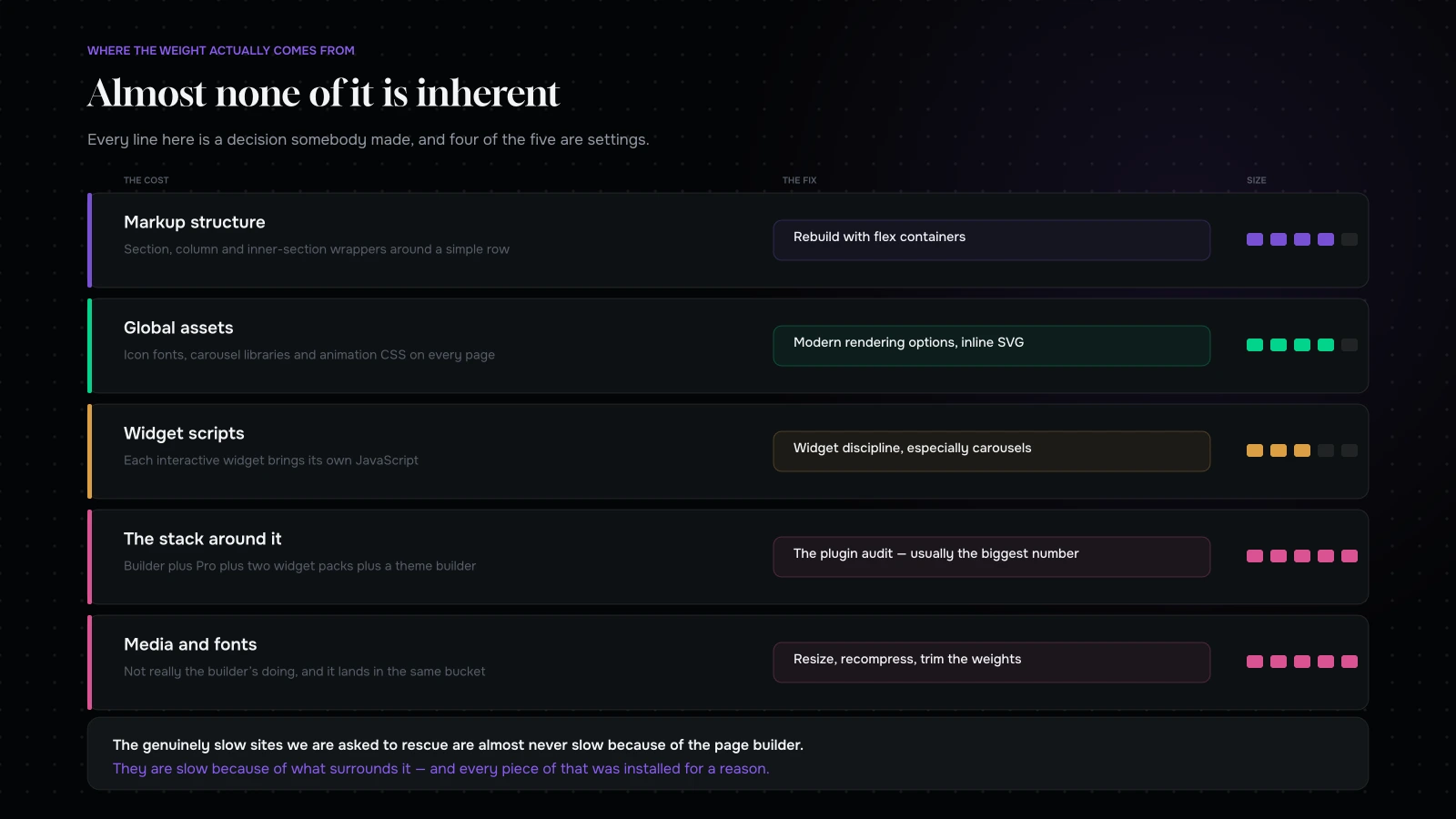
Where a page builder's weight actually comes from: markup structure, global assets, widget scripts, plugin stacking and unoptimised media
Almost none of it is inherent. Every line here is a decision somebody made.

Five things, and they are quite different in size.

Markup structure. Older Elementor layouts nest section, column and inner-section wrappers around everything, which produces a deep DOM for a simple row. Deep DOM costs rendering time and it costs it on every page.

Global assets. Icon fonts, a carousel library, animation CSS, dialog scripts — historically loaded on every page whether or not anything used them.

Widget scripts. Each interactive widget has its own JavaScript, and a page with eight of them loads eight.

The stack around it. Elementor plus a Pro add-on plus two third-party widget packs plus a theme with its own builder is where genuinely slow sites come from, and it is extremely common.

Media and fonts, which are not really Elementor’s doing at all but land in the same bucket when people measure.

The good news is that four of those five are now controllable, and most of the control is in settings rather than in code.

Step one: turn on the modern rendering options

Elementor ships newer rendering behaviour behind feature flags so existing sites do not break. On any site that has been running for a while, several of the improvements are simply switched off.

Go through the experiments panel and, on a staging copy, enable the modern options — the ones concerning optimised DOM output, improved asset loading, improved CSS loading, inline font icons and element caching. Then test every template properly, because these change how markup and assets are produced and an older layout can shift.

This is the highest-return half-hour available on most Elementor sites. It costs nothing, it needs no developer, and on a site built two or three years ago it commonly removes a large share of the unnecessary payload in one go.

Test, though. On a staging copy. Every time.

Step two: containers, not sections and columns

The single biggest structural improvement available.

Older layouts wrap everything in section, then column, then sometimes inner-section. The flex container approach replaces that with a single element that does the same job, and the difference in DOM depth on a real page is substantial — fewer nodes, less CSS, faster rendering, and markup that a developer can actually read.

The catch is that existing pages do not convert themselves. Rebuilding a template with containers is real work, and it is worth prioritising by traffic: your product template, your main landing pages and your article template first; the pages nobody visits, never.

If you are starting a new site on Elementor, use containers from the first day and never build a section-and-column layout again.

Step three: widget discipline

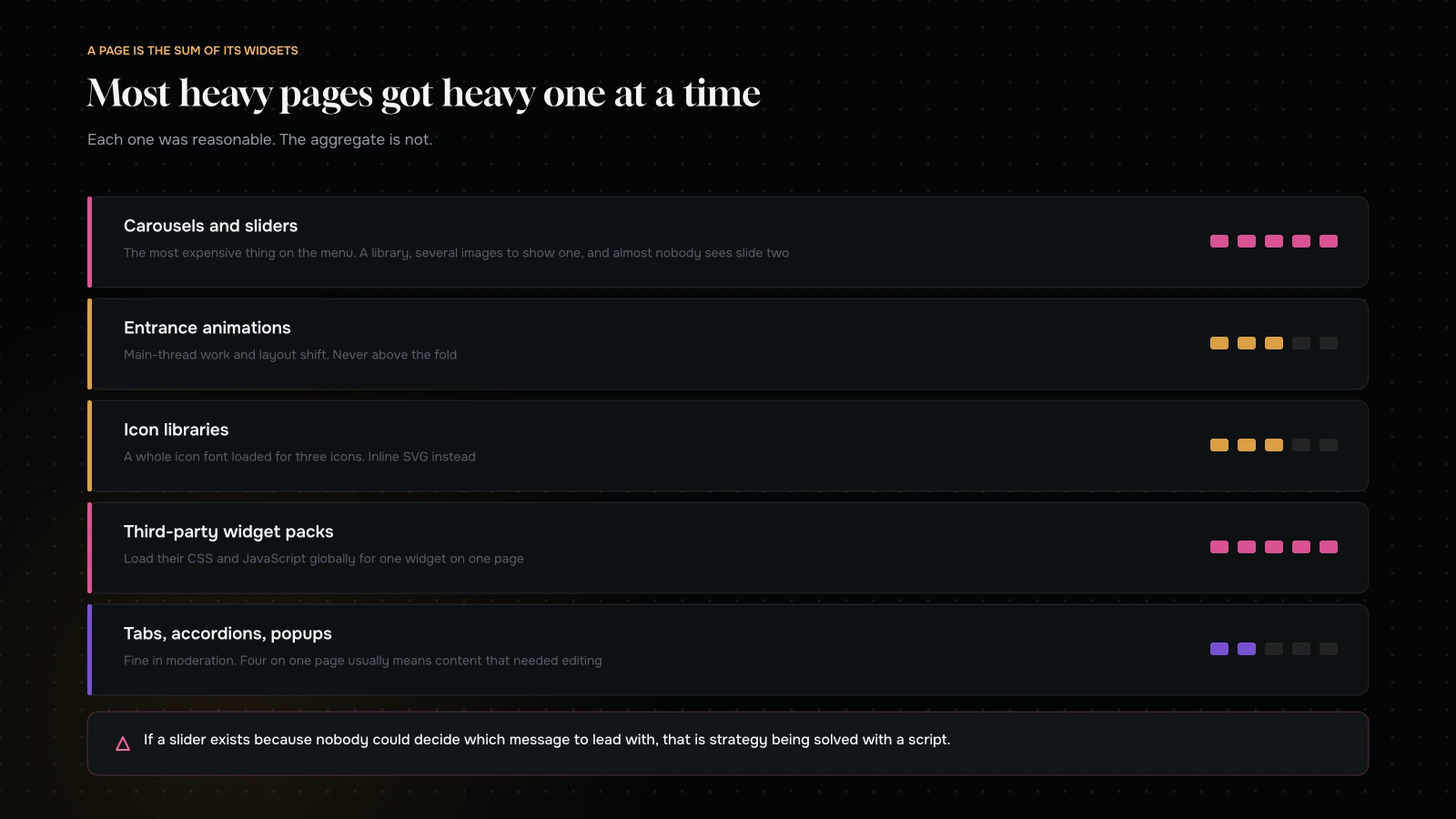
Widget-level decisions that cost the most on an Elementor page, from carousels and animations to icon libraries and third-party widget packs
A page is the sum of its widgets. Most heavy pages are heavy one reasonable widget at a time.

Each widget you place has a cost, and they are not equal.

Carousels and sliders are the most expensive thing on the menu. They load a library, they usually load several images to display one, and on most sites almost nobody interacts with the second slide. If a slider exists because nobody could decide which message to lead with, that is a strategy problem being solved with a script.

Animations cost more than they look. Entrance animations on twenty elements produce work on the main thread and layout shifts if they are not handled carefully. Use them sparingly and never on anything above the fold.

Icon libraries. Elementor can load a full icon font for the sake of three icons. Prefer inline SVG icons, and if you have the option to inline font icons, use it.

Third-party widget packs. Enormously convenient, and they frequently load their own CSS and JavaScript globally for the sake of one widget on one page. If you use one, check whether it offers per-widget asset loading, and disable the widgets you do not use.

Tabs, accordions and popups each add a script. Fine in moderation; a problem when a page has four of them because they were convenient ways to hide long content that should have been edited instead.

Step four: images, which are still most of your bytes

Nothing here is Elementor-specific and it is where most of the weight actually is.

Serve the correct size for the slot. A background image set at full width on a section that is 400 pixels tall is very often a 3000-pixel original.

Use a modern format. WebP for photography, SVG for anything vector.

Compress before uploading, or use something that does it on upload. Relying on nothing is how a media library ends up averaging two megabytes an image.

Do not lazy-load the hero. Elementor and WordPress will lazy-load images by default; the one above the fold should be excluded.

Set dimensions. Layout shift on Elementor pages is very often an image whose space was not reserved.

Step five: fonts

Two families, and only the weights you actually use. Every additional weight is another file.

Host them locally rather than fetching from a third party — it removes a connection and it is better for privacy.

Preload the one used above the fold.

Check what your theme and your widget packs are loading, because it is common to find three font families on a site that was designed with two.

Step six: CSS output and caching

Elementor generates CSS per page and per post. Two settings matter.

The CSS print method. External files are cacheable and generally the right choice for a site with more than a handful of pages. Inline embedding avoids a request and bloats the HTML on every single load, which is usually the worse trade.

Regenerate the CSS after any global change, and clear the caches. Stale generated CSS is behind a surprising share of “the change did not appear” reports.

Then the ordinary WordPress performance stack: a page cache, sensible object caching, a CDN, and a host that is not the cheapest shared plan available. The page builder gets blamed for a great deal that is really hosting.

Step seven: the plugin stack around it

The genuinely slow Elementor sites we are asked to rescue are almost never slow because of Elementor. They are slow because of what surrounds it.

A typical example: Elementor, plus Pro, plus two widget add-on packs, plus a theme with its own builder, plus a slider plugin, plus a popup plugin, plus a form plugin, plus an animation library, plus a chat widget, plus three analytics tools.

Every one of those was installed for a reason. Together they load an enormous amount on every page, and several of them do overlapping jobs.

The audit is the same one that works for any commerce store: list everything, name who wants it and what it earns, find the duplicates, and remove what nobody defends. On WordPress specifically, also check for plugins loading assets globally when they are needed on one page — several popular ones do this and several offer a setting to stop it.

The settings checklist

One table, for whoever is doing the work.

SettingSet it toWhy
Modern rendering experimentsOn, tested on stagingUsually the single largest free win on an older site
Layout structureFlex containersFar fewer DOM nodes than section and column
Icon outputInline SVG where possibleAvoids loading a whole icon font for three icons
CSS print methodExternal filesCacheable, instead of bloating every HTML response
Google FontsHosted locally, weights trimmedOne fewer connection, and fewer files
Hero imageExcluded from lazy loadingIt is the thing being measured
Image dimensionsAlways setThe cheapest layout-shift fix there is
Generated CSSRegenerated after global changesStale CSS is behind most “it did not update” reports
Third-party widget packsPer-widget loading, unused widgets offThey load globally by default
Page cache and CDNOn, and actually configuredThe builder gets blamed for a lot of hosting

Work down it on a staging copy, check the three templates that matter after each change, and re-measure at the end.
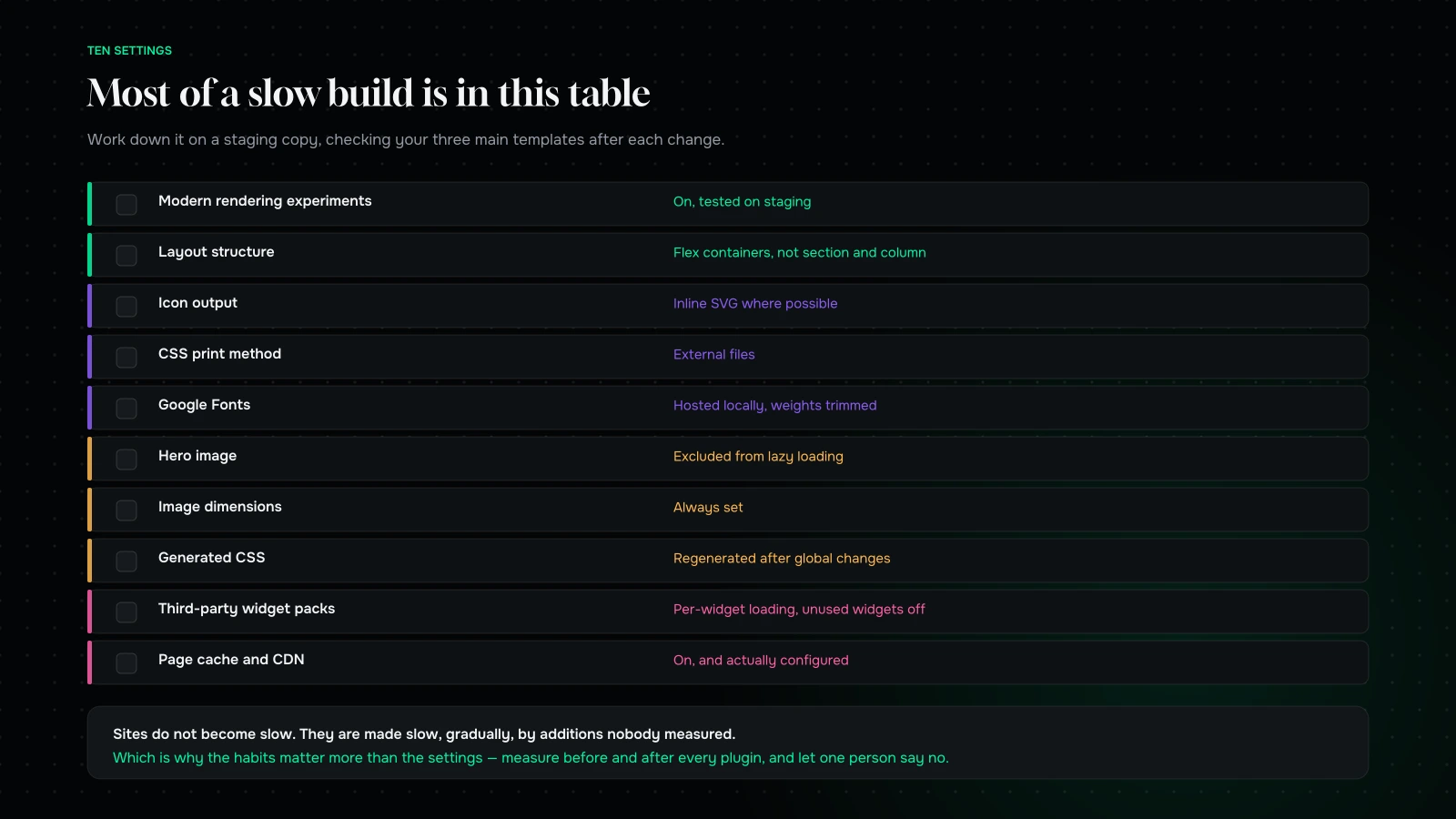
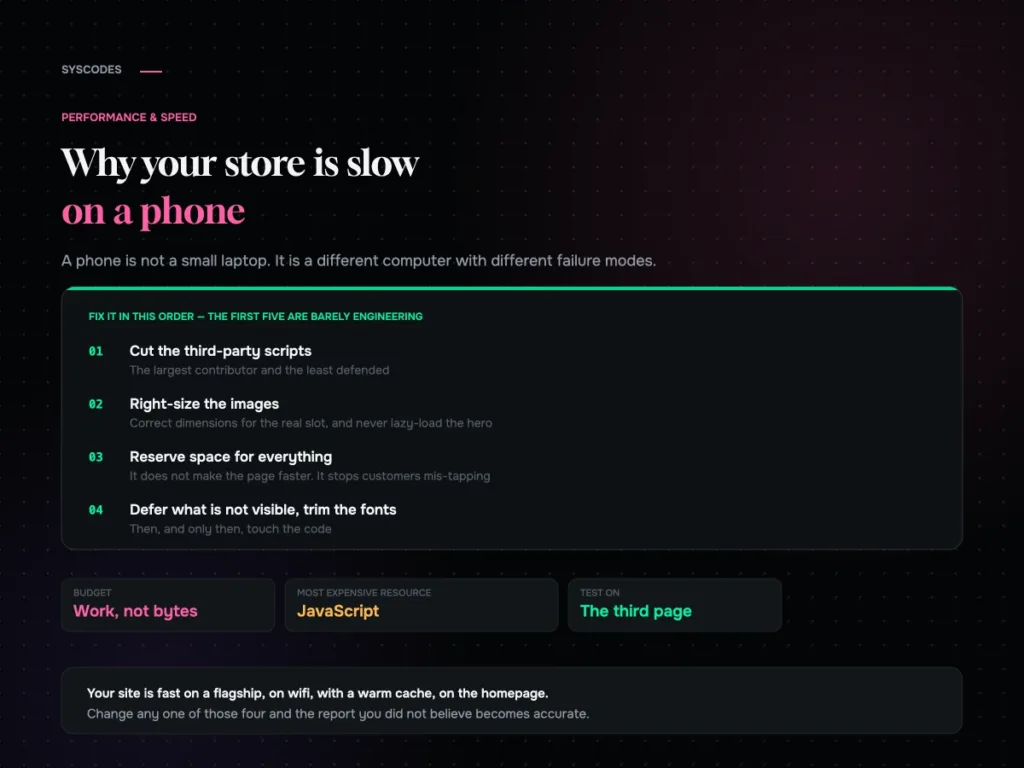
An Elementor settings checklist covering rendering experiments, containers, icons, CSS output, fonts, images and caching
Ten settings. Most of a slow Elementor site is in this table rather than in its code.

When to stop using the builder for a template

An honest limit, from people who build with it.

A page builder is excellent for pages that change often and are edited by non-developers: landing pages, campaign pages, marketing pages, anything the marketing team owns. That is what it is for, and the productivity gain is real.

It is a poor fit for a template that is rendered thousands of times and never edited — a product template, an archive, a listing. Those are worth building as theme templates, because you pay the rendering cost on every view and you get no editing benefit in return.

Most fast Elementor sites we have built are hybrids: a handful of theme-level templates for the high-traffic, low-change pages, and the builder for everything the marketing team touches. That is not a criticism of the tool. It is using it where it pays.

What we do differently when we build one

Five habits, from building Elementor sites we are still happy with two years later.

Design a component set before building any pages. Decide the six or seven block types the site actually needs — hero, feature row, proof, list, quote, call to action — build each one once as a global template or a saved container, and assemble pages from those. Sites built page-by-page accumulate forty slightly different versions of the same row, and every variant is more CSS.

Set the global styles properly and never override locally. Typography scale, colours, spacing, all defined once. The temptation to nudge a margin on a single element is where design systems go to die, and it is also where your generated CSS doubles.

Keep one template per job. One article template, one landing template, one service template. If a page needs to be different, ask whether it needs to be different or whether somebody just wanted a change.

Build the high-traffic, low-change templates in the theme. Archives, listings, anything rendered thousands of times. The builder is for pages people edit.

Put a hard limit on above-the-fold widgets. A heading, a line of text, one image, one button. Anything else is competing for the first two seconds, and the first two seconds are the ones that decide bounce.

None of this is exotic and all of it is easier to do at the start than to retrofit — which is the honest reason so many Elementor sites are slow. They were not built badly. They were built quickly, by somebody who was not going to be the one maintaining them.

What good looks like

A well-built Elementor page should be indistinguishable from a hand-built one in the numbers that matter. Concretely, on a content or marketing page: a modest total transferred weight, a small number of third-party domains, no layout shift after first render, and interactions that respond immediately.

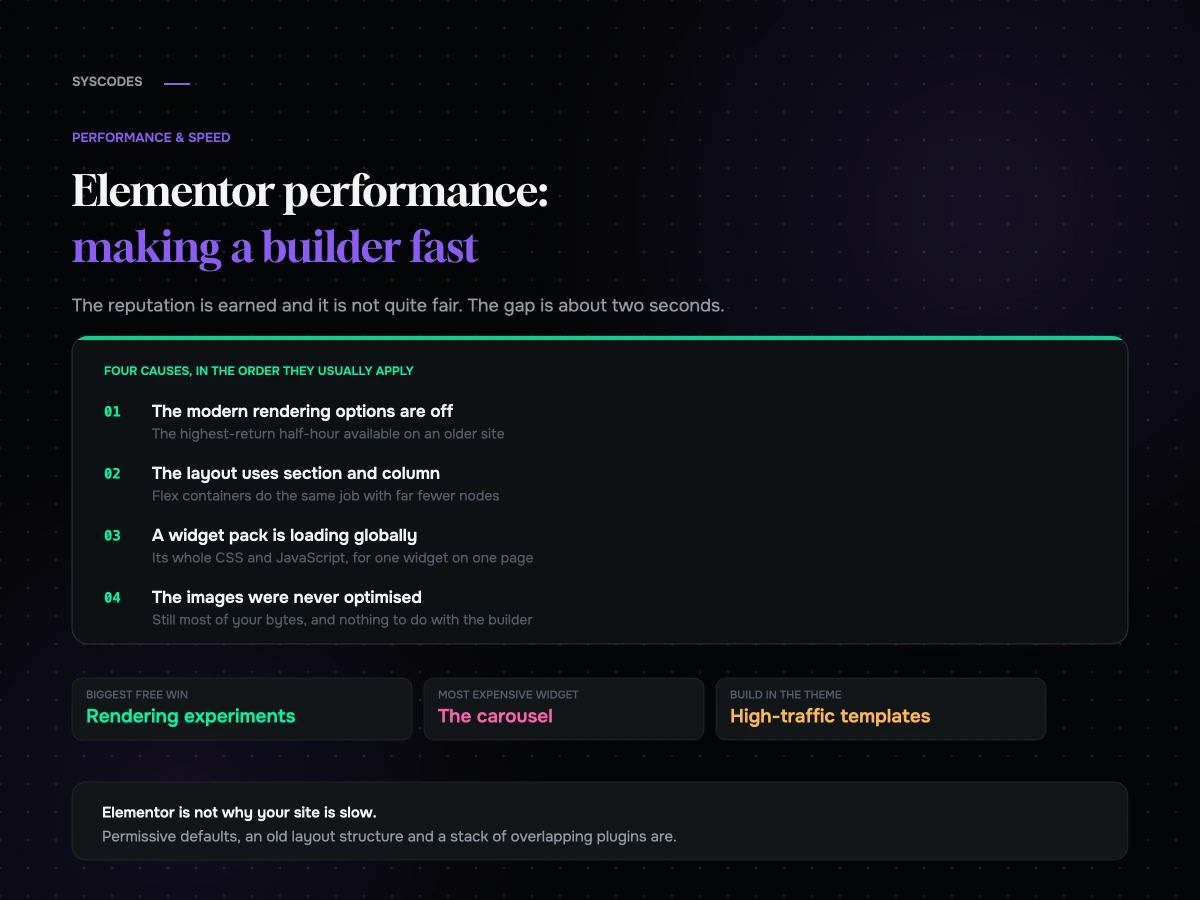
If you are a long way from that, the cause is almost always one of four things: the modern rendering options are off, the layout is built with the old section-and-column structure, there is a widget pack loading globally, or the images were never optimised. In that order.

A two-hour plan for an existing site

If you have a live Elementor site and two hours, this is where we would spend them.

First twenty minutes: measure. Product or main landing page, cold cache, mobile, throttled. Record total bytes, request count, third-party domains, and note anything that visibly moves after the page has started rendering. Those four numbers are your before.

Next twenty: the experiments panel, on staging. Turn on the modern rendering options one at a time, checking your three most important templates after each. Anything that breaks a layout gets noted rather than abandoned — it usually means that layout is built with the old structure and wants rebuilding anyway.

Next thirty: the plugin list. Every active plugin, what it does, whether anything on the site still uses it. Deactivate the obvious dead weight on staging and re-measure. This is usually where the largest single number appears.

Next thirty: images. Find the ten largest files in the media library and check where they are used. Resize and recompress them. If your hero is a 3 MB photograph, this one step will outperform everything else in this list.

Last twenty: settings. CSS print method to external files, fonts hosted locally and trimmed to the weights you use, lazy-loading excluded for the hero, page cache on, and regenerate the generated CSS.

Then measure again. On most sites that have never had this done, the before-and-after difference is large enough that nobody argues about the next phase.

The three arguments we hear, answered

“We should just rebuild it without a page builder.” Sometimes right, usually premature. A rebuild costs a quarter and re-creates the same problem in a different tool if the underlying habits — carousels, ten plugins, unoptimised images — travel with you. Do the two hours above first. If the site is still slow afterwards, the rebuild argument is now evidence-based rather than aesthetic.

“Our host says it is the plugins.” Often partly true, and worth checking rather than accepting. Hosts have a commercial interest in it not being the hosting, and merchants have an interest in it not being their plugin choices. Measure server response time on an uncached page: if it is slow with a light page, the host is in the frame; if it is fine and the page is heavy, it is not.

“It was fast when we launched.” Almost always true, and it is the whole story. Sites do not become slow; they are made slow, gradually, by additions nobody measured. That is why the last section of this article matters more than the technical ones.

Keeping it fast

Four habits, none technical, all of which are the difference between a site that stays quick and one that needs this exercise again next year.

Measure before and after every plugin installation. Five minutes. If it costs more than it earns, uninstall it the same day, while you still remember why you were testing.

Give one person the authority to say no to an addition. Without that, the budget is a suggestion.

Review the plugin and widget-pack list every quarter. Anything nobody can defend gets removed.

Set a page-weight number for your main templates and check it monthly. A single number on a single page, visible to the team. It is remarkable how much discipline one visible number produces.

What it comes down to

Elementor is not why your site is slow. Permissive defaults, an old layout structure, a stack of overlapping plugins and unoptimised images are why your site is slow, and all four are fixable without leaving the tool.

Turn on the modern rendering options — carefully, on staging. Rebuild your highest-traffic templates with containers. Be disciplined about widgets, especially carousels. Fix the images. Then look hard at everything else you have installed, because that is usually where the real weight is.

And use the builder where it earns its keep: pages people edit. For the templates nobody edits and everybody loads, write a theme template.

Want to know why yours is slow? Send us the URL through the contact form and we will come back with which rendering options are off, what is loading globally that should not be, and the three changes we would make first. We build on Elementor daily, so we know exactly where to look.

You can also read Core Web Vitals for commerce, or WordPress vs Webflow vs Wix.

We build on Elementor daily

Send us the URL and we will tell you which options are off and what is loading globally.

You will get back which rendering options are switched off, which plugins and widget packs are loading site-wide when they are needed on one page, the ten heaviest images, and the three changes we would make first.

If the honest answer is that your highest-traffic templates should be built in the theme rather than in the builder, we will tell you that — it is a smaller change than a rebuild and it usually does more.

NDA on request · you will hear back from Sayan or a senior lead, never a bot
Question about your project? Tell us in 30 seconds — a senior lead replies.